PokémonĀkaibu - Modular Vanilla JS Pokédex
Project Overview
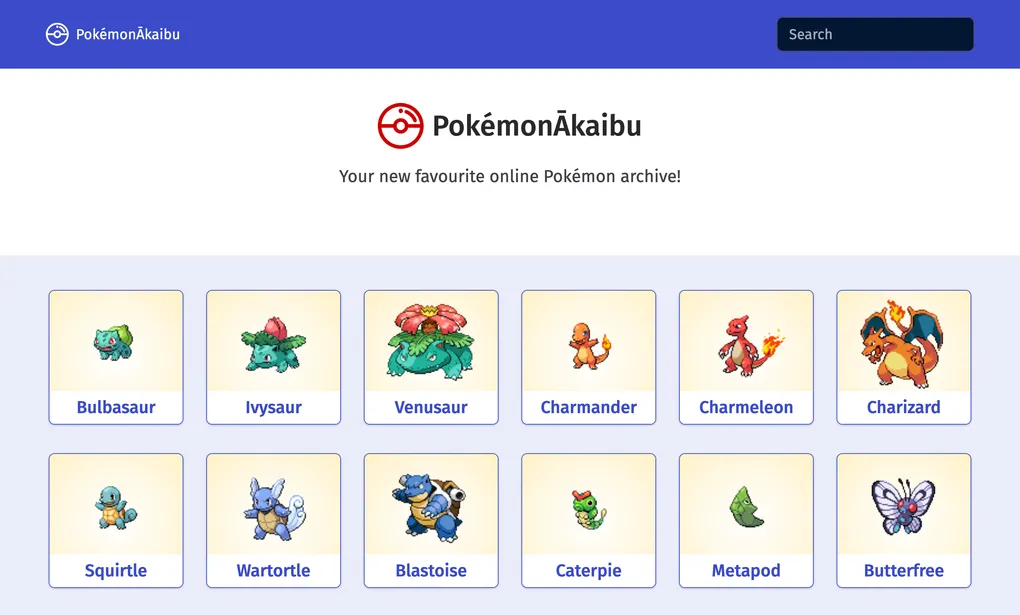
PokémonĀkaibu is a modular, client-side Pokédex built with vanilla JavaScript and the PokéAPI. It aims to be a fast, scrollable archive where users can browse Pokémon, search by name, and open a detail view with stats, types and abilities.
- Role: Solo front-end developer
- Context: Course project focused on vanilla JS, APIs, and browser compatibility
- Tech: JavaScript (ES6+), HTML5, CSS3, Bootstrap 5, PokéAPI, Fetch API + polyfill, Promise polyfill, jQuery, Prettier, ESLint
The brief was to build a data-driven web app without frameworks, consuming a public API and presenting the results in a usable, responsive interface. I treated PokémonĀkaibu as a chance to practice modular JavaScript, incremental loading, and progressive enhancement for older browsers.
Read more about the brief and goalsCollapse brief and goals
The Challenge
The assignment was to create a vanilla JavaScript application that:
- Fetches data from a public API (PokéAPI),
- Presents that data in a scrollable, responsive UI,
- Allows users to drill down into details,
- And handles performance and compatibility without relying on React, Angular or similar frameworks.
On top of that, I wanted the codebase to be modular and maintainable: clear separation between data fetching, UI rendering and user interaction, with an eye toward being understandable to other developers.
Objectives and Success Criteria
I set a few concrete goals for PokémonĀkaibu:
-
Make browsing easy at scale
Display Pokémon in batches, with a smooth infinite-scroll-style experience instead of dumping the entire Pokédex at once. -
Provide meaningful detail views
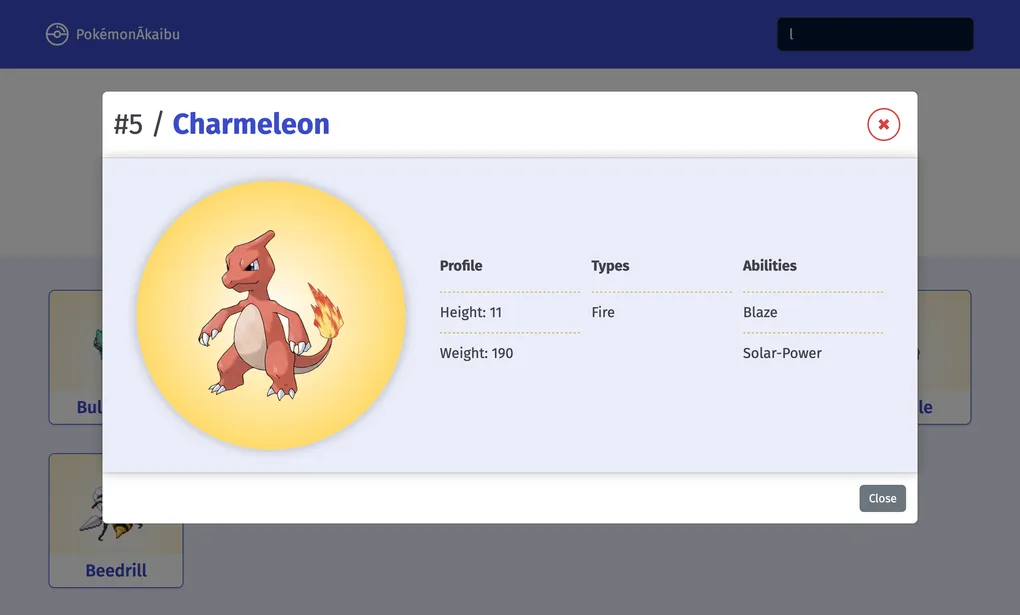
When a user clicks a Pokémon, show a focused modal with its name, artwork, stats, types and abilities. -
Support basic search
Allow users to search Pokémon by name from the main screen. Searching by ID is noted as a planned enhancement for later. -
Be friendly across devices and browsers
Use responsive layout and polyfills so the app remains usable on older browsers as well as modern ones. -
Keep the JavaScript modular
Organize code into small, focused modules for fetching data, transforming it and rendering UI, so it’s easier to extend.
I considered the project successful if: users could scroll, search, and open detailed modals without noticeable lag, and the code stayed readable enough that I’d be happy to build on it later.
Architecture Overview
PokémonĀkaibu is a static, client-side web app: a single HTML file, modular JavaScript, and CSS powered by Bootstrap and custom styles. All data comes directly from the PokéAPI at runtime.
Read architecture detailsCollapse architecture details
-
Static hosting, dynamic data
The app is just static assets (index.html,css/,js/,img/). There’s no backend of its own; all dynamic behavior happens in the browser via JavaScript. -
Modules & responsibilities
JavaScript is split into responsibilities such as:- fetching Pokémon lists and details from PokéAPI,
- transforming responses into a normalized format,
- rendering list items and detail modals,
- and wiring up scroll and search behavior.
-
Data loading strategy
Pokémon are loaded in batches. As the user scrolls, new batches are requested, appended to the DOM and cached in memory. This keeps initial load time low and avoids fetching the full Pokédex up front. -
UI layer
The UI uses:- Bootstrap 5 for the grid, basic layout and modal component,
- custom CSS for Pokémon-specific styling,
- jQuery plus vanilla JS for DOM querying, event handling and small UI utilities.
-
Compatibility & polyfills
Because the app targets a mix of browsers, it:- uses the Fetch API for network requests,
- ships polyfills for
fetchand Promises so older browsers can still run the app, - avoids build tools by writing code in a way that works directly in the browser.
-
Development workflow
The app is designed to run via a simple static server; during development, I used the VS Code Live Server extension for quick reloads and easier debugging.
What the app does
From a user’s point of view, PokémonĀkaibu lets you:
- Scroll through a growing list of Pokémon, each with name and artwork.
- Load more as you go instead of waiting for the entire Pokédex to load.
- Search by name using a search bar to quickly jump to a specific Pokémon.
- Open a detail modal for any Pokémon to see:
- base stats,
- types,
- and abilities.
- Use the app on different devices, thanks to a responsive layout that adapts from mobile to desktop.
Search by ID and more advanced filtering are noted as future enhancements, but the current version already covers the core “browse + inspect details” loop.
Implementation & Testing
Key implementation highlights
- Incremental loading: Implemented batched requests to PokéAPI so Pokémon are loaded as the user scrolls, keeping initial load fast.
- Detail modals: Used Bootstrap’s modal component wired to JavaScript to display rich details for the selected Pokémon.
- Search by name: Connected a search input to the in-memory list of Pokémon, filtering by name without a full refetch.
- Progressive enhancement: Used Fetch and Promise polyfills to keep older browsers functional.
- Code quality: Used ESLint and Prettier to maintain consistent, readable JavaScript.
Read full implementation processCollapse full implementation process
Phase 1 – Exploring PokéAPI and shaping the UI
I started by exploring the PokéAPI response structure:
- which endpoints to call for listing Pokémon,
- how to get detail information (stats, types, abilities),
- and what data to show in the list vs. detail view.
From there, I sketched a simple UI:
- a scrollable list of Pokémon cards with names and images,
- a search bar at the top,
- and a modal that shows full details when a card is clicked.
Key learning: understanding the API first made it easier to avoid over-fetching or duplicating data.
Phase 2 – Building the list and detail workflow
Next, I implemented the basic list → detail flow:
- Fetch a batch of Pokémon,
- Render each as a card with image and name,
- Attach click handlers that fetch (or reuse cached) detail data,
- Populate and open a Bootstrap modal with stats, types and abilities.
The aim was to keep the interaction fast and predictable: click → see details, close → return to the same scroll position.
Phase 3 – Incremental loading and performance
To make the app scalable, I focused on incremental loading:
- Load an initial batch of Pokémon on page load,
- Detect when the user nears the end of the list and fetch the next batch,
- Append new cards to the DOM without re-rendering everything.
This reduces the initial payload and keeps the UI responsive, even on slower connections.
Phase 4 – Search and client-side filtering
Once the basic browsing worked, I added search:
- A search input listens for text changes,
- The displayed list is filtered client-side by Pokémon name,
- Clearing the search restores the full (currently loaded) list.
Search by ID is planned as a future addition, but the name-based search already covers common usage for fans who know at least part of a Pokémon’s name.
Phase 5 – Compatibility and polish
Finally, I refined compatibility and UX:
- Included polyfills for
fetchand Promises so older browsers can run the app, - Tweaked layout breakpoints and font sizes for mobile vs. desktop,
- Added loading indicators and simple error states if network requests fail.
Key learning: even for a “simple” app, performance and compatibility decisions have a big impact on how polished it feels.
Testing strategy
PokémonĀkaibu does not yet have automated tests, so I relied on structured manual testing plus linting.
Read more about testingCollapse testing details
The testing approach included:
-
Manual functional testing
- verifying that batches of Pokémon load correctly as you scroll,
- opening and closing detail modals for different Pokémon,
- using the search bar with partial and full names,
- deliberately triggering network errors (e.g. offline mode) to see error handling.
-
Responsive checks
- testing the layout across different viewport sizes to ensure the grid and modal remain usable on mobile and desktop.
-
Cross-browser sanity checks
- checking behavior in modern browsers and confirming that polyfills keep core functionality working in older ones.
-
Linting and formatting
- using ESLint and Prettier to catch obvious mistakes and enforce consistent code style.
If I revisit the project, I’d like to add basic automated tests around data transformation and maybe a few integration-style tests that simulate the scroll + load + detail flow.
UX & UI considerationsCollapse UX & UI considerations
UX & UI considerations
Even though this is a vanilla JS project, my design background influenced the interface:
-
Card layout for scanning
Each Pokémon is shown as a small card with artwork and name, making it easy to scan and recognize favorites quickly. -
Progressive disclosure
The list stays lightweight, and full stats only appear in the modal when requested. This prevents the main screen from becoming a wall of numbers. -
Search as a first-class control
The search bar sits near the top of the screen, clearly signposted as the main way to jump to a specific Pokémon. -
Responsive design
Bootstrap’s grid and utilities help the layout adapt from narrow mobile screens to larger desktops without needing completely separate designs. -
Visual hierarchy
Within the detail modal, key information (name, image, main stats) is prioritized visually, with secondary details (abilities, types) grouped clearly.
ResultsCollapse results
Results
From a user’s perspective, PokémonĀkaibu offers:
- A quick way to browse a large set of Pokémon without heavy initial loading,
- A simple search to get to a specific Pokémon by name,
- And a focused detail view that surfaces the most relevant stats and attributes.
From a learning perspective, this project helped me:
- Practice structuring a non-trivial vanilla JavaScript app without frameworks,
- Work with a public API and think about how to shape responses into UI-friendly data,
- Handle incremental loading and performance in the browser,
- And consider compatibility and progressive enhancement with polyfills.
Limitations and Trade-offsCollapse limitations and trade-offs
Limitations and Trade-offs
Some current limitations:
-
Read-only experience
The app is a viewer; there is no login, no favorites and no way to customize the dataset. -
Search scope
Search only covers Pokémon names; searching by ID or other attributes is not yet implemented. -
No offline mode
The app requires a network connection to fetch data from PokéAPI. There is no caching strategy beyond what the browser naturally provides. -
No automated tests
Reliability currently depends on manual testing and the stability of PokéAPI. -
Single data source
All information comes from PokéAPI; there’s no fallback or secondary source if that API is unavailable.
These are acceptable trade-offs for a portfolio-scale project focused on vanilla JS and API integration, but they also highlight where the app would need to grow for a production scenario.
Future Improvements & RoadmapCollapse future improvements
Future Improvements & Roadmap
If I extend PokémonĀkaibu in the future, some natural next steps would be:
-
Search by ID and advanced filters
Allow searching by Pokédex ID and filtering by type, generation or other attributes. -
Favorites and collections
Let users mark favorite Pokémon and group them into simple collections or “teams”. -
Offline-friendly mode
Cache recently viewed Pokémon and core assets so the app remains partially usable offline. -
Accessibility enhancements
Review the app with a focus on keyboard navigation, ARIA attributes and screen reader behavior. -
Automated testing
Add tests for data fetching and transformation, plus a small set of UI tests to guard core flows.
These changes would turn PokémonĀkaibu from a solid vanilla JS demo into a more fully featured Pokédex experience.
What I learned
PokémonĀkaibu gave me a focused way to deepen my vanilla JavaScript skills:
- structuring code into modules instead of leaning on frameworks,
- consuming and shaping data from a public API,
- managing incremental loading for performance,
- and thinking about compatibility and UX even in a small project.
It sits in my portfolio as a good example of how I approach API-driven front-end work when I’m working close to the browser, without a framework in between.
Technologies Used
- JavaScript (ES6+)
- HTML5
- CSS3 (with custom styles and responsive design)
- Bootstrap 5 (for layout and UI components)
- PokéAPI (for Pokémon data)
- Fetch API (with polyfill for compatibility)
- Promise API (with polyfill for compatibility)
- jQuery (for DOM manipulation and event handling)
- Live Server (for local development, via VSCode extension)
- Prettier (for code formatting)
- ESLint (for code linting)