NoodlesBowl React Native app - A smart, tangled web of live conversation.
Project Overview
NoodlesBowl is a modern, cross-platform chat application built with React Native, Expo, and Firebase. Users can join a shared chat room anonymously, send messages, share images and their location, and keep conversations readable even with intermittent connectivity.
- Role: Solo mobile developer
- Context: Course project focused on real-time messaging, mobile UX, and accessibility
- Tech: React Native (Expo), Firebase (Auth, Firestore, Storage), React Navigation, AsyncStorage, react-native-gifted-chat, Expo Location & Image Picker, NetInfo, EAS
The brief was to build a real-time chat app that feels at home on iOS and Android: fast to start, simple to use, and resilient to flaky mobile networks. I treated it as an opportunity to practice real-time data flows, offline-first behaviors, and mobile accessibility.
Read more about the brief and goalsCollapse brief and goals
The Challenge
The assignment was to create a cross-platform chat app using React Native and Expo, backed by a real-time data store. It needed to:
- Let users join a chat quickly without a complex signup,
- Persist and sync messages in real time,
- Support media (images) and location sharing,
- Handle going offline and coming back gracefully,
- And respect accessibility basics on mobile.
The “hidden” challenge was to make all of this feel coherent in a small codebase: manageable files, clear data flow, and behavior that makes sense from a user’s point of view.
Objectives and Success Criteria
Within that brief, I set a few concrete goals:
-
Fast onboarding
Let users choose a display name and theme color, then start chatting in a couple of taps — no traditional email/password registration. -
Reliable real-time chat
Use Firebase Firestore to sync messages across devices, with a UI that updates smoothly as messages come in. -
Rich messages, simple controls
Support text, images and location sharing from a compact, discoverable “+” button in the input area. -
Offline-friendly behavior
Cache recent messages locally and make it clear when the app is offline, so users aren’t surprised by missing or unsent messages. -
Accessible by design
Provide meaningful accessibility labels, contrast-aware color choices and screen reader hints that make the app usable beyond perfect visual and motor conditions.
I considered the project successful if:
- Chatting felt responsive and predictable on both iOS and Android simulators/devices,
- The app handled network drops and reconnections without corrupting the chat history,
- The codebase clearly showed how messages flow from UI → Firebase → UI,
- And I could walk through the accessibility decisions in a way that made sense to a reviewer.
Architecture Overview
NoodlesBowl is a React Native + Expo app with a simple screen flow (Start → Chat) on top of Firebase services for authentication, real-time messages and media storage.
Read architecture detailsCollapse architecture details
-
Screens and navigation
The app is split into two main screens:Start– where users enter a display name and choose a background color.Chat– the main chat room interface.
React Navigation manages the stack so users move from Start → Chat with the chosen settings passed as route parameters.
-
Firebase integration
A sharedfirebase.jsmodule initializes Firebase services:- Anonymous authentication for quick entry,
- Firestore for real-time messages,
- Storage for user-uploaded images.
Messages are stored in a single Firestore collection, with each document containing text, metadata, optional image URLs and optional coordinates.
-
Chat UI layer
The chat interface is built onreact-native-gifted-chat, customized to:- Render text messages,
- Display images from Firebase Storage,
- Show map previews for messages with location data,
- Use the user’s chosen background color while keeping text readable.
-
Offline support & network handling
Recent messages are cached viaAsyncStorage, and@react-native-community/netinfois used to:- Detect when the device goes offline,
- Show an appropriate UI state,
- Avoid trying to send messages when there’s no connection.
-
Configuration & builds
Firebase credentials are injected via.envintoapp.config.jsunderexpo.extra.firebase, and the project is configured for EAS builds (development / preview / production) usingeas.json.
What the app does
From a user’s point of view, NoodlesBowl lets you:
- Enter a display name and pick a chat background color.
- Join the chat anonymously — no email, no password.
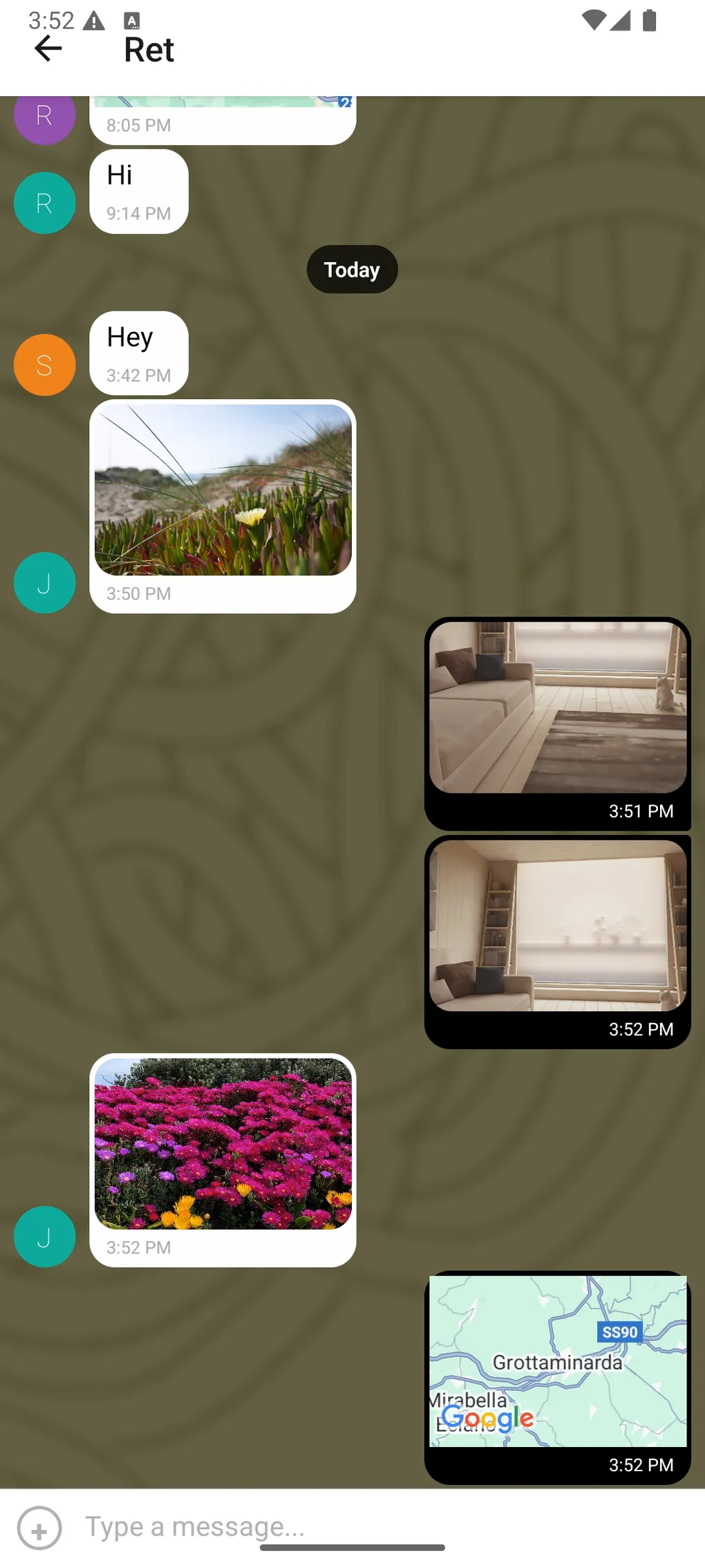
- Send text messages in real time to everyone in the room.
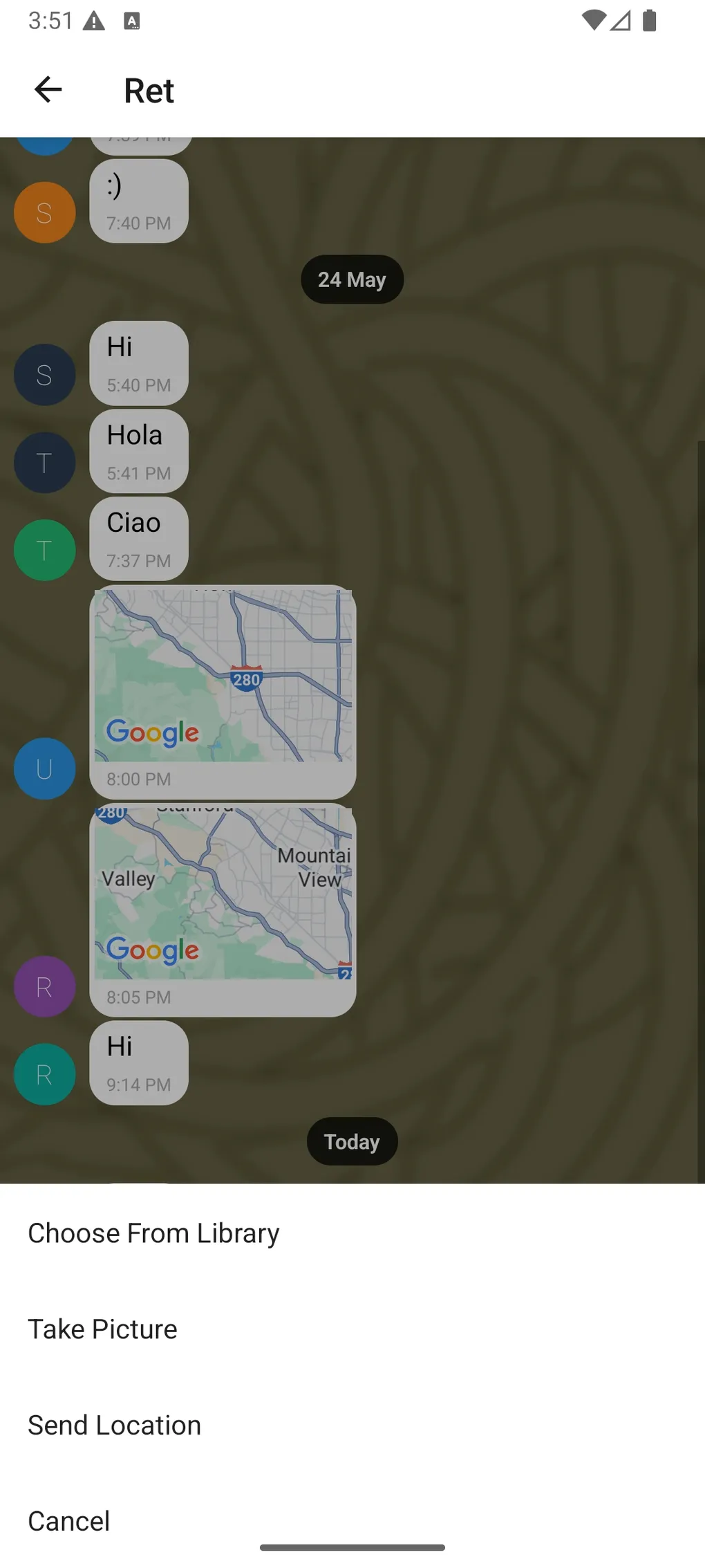
- Share images from the camera or gallery via a single “+” entry point.
- Share your location, which appears as a tappable map bubble.
- Stay in the conversation when offline:
- Previously loaded messages remain visible,
- New messages sync automatically when the connection returns.
The focus is on making the experience feel like a lightweight, low-friction group chat: quick in, quick messages, and a visual style that feels personal without breaking readability.
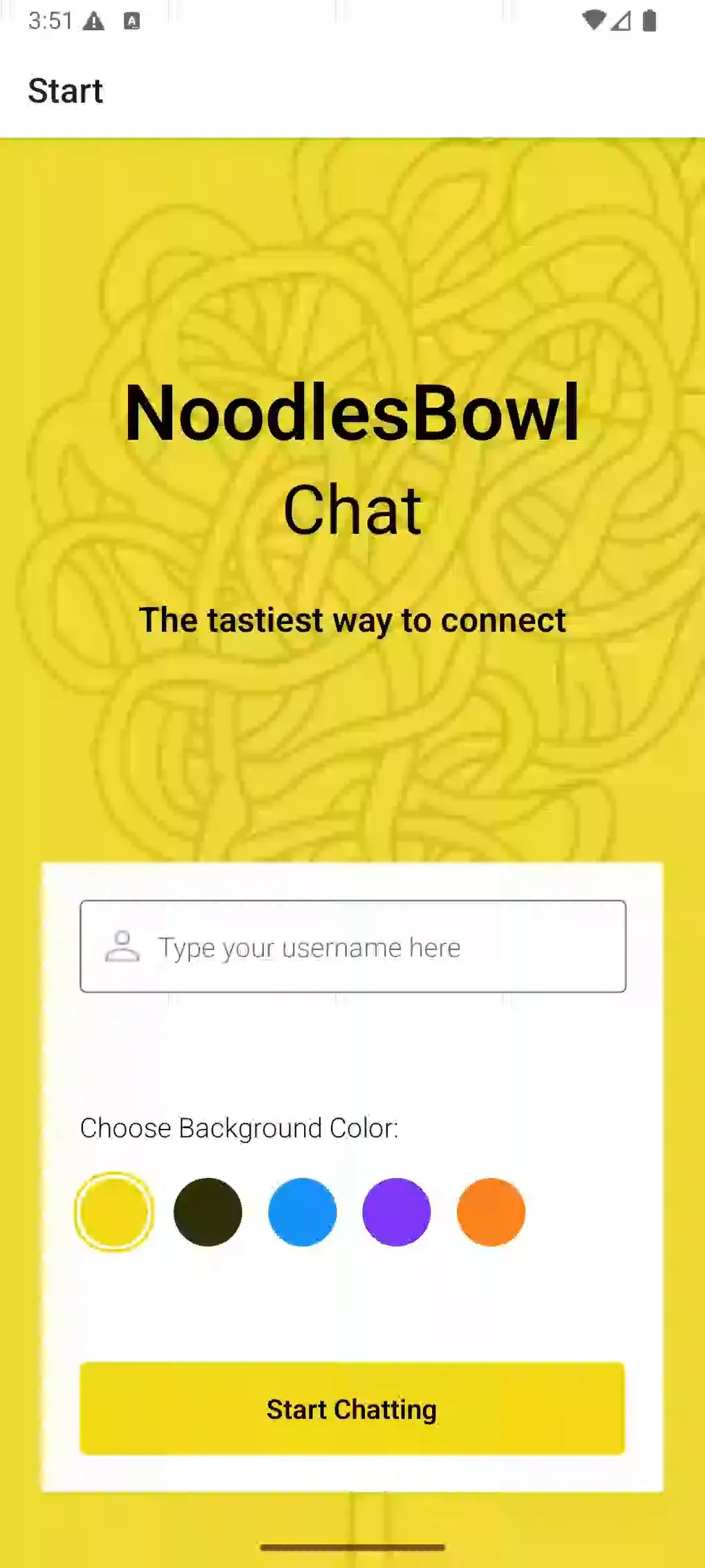
Home screen with quick access to chat.
Implementation & Testing
Key implementation highlights
- Start screen: Built a simple, focused screen where users choose a name and color, with validation and contrast-aware color labels.
- Chat screen: Implemented the main chat using
react-native-gifted-chat, wired to Firestore for real-time message syncing. - Media & location: Integrated Expo Image Picker and Expo Location so users can attach images or send their current location from a custom actions menu.
- Offline & network state: Cached recent messages in
AsyncStorageand used NetInfo to respond to connectivity changes and adjust behavior. - Configuration & builds: Centralized Firebase config via
app.config.jsand.env, and set up EAS build profiles for device testing.
Read full implementation processCollapse full implementation process
Phase 1 – Defining flows and data model
I started by mapping the core user flow:
- Open the app → see the Start screen.
- Enter a name and choose a background color.
- Tap “Start Chatting” → navigate to the Chat screen.
- Send and receive messages (text, image, location) in real time.
Based on that, I defined a minimal message shape for Firestore: text (optional), createdAt, user information, and optional image and location fields. This keeps the data model compact but expressive enough to support the required features.
Key learning: Even simple chat apps benefit from an explicit, minimal message schema before touching the UI.
Phase 2 – Screen structure and navigation
Next, I wired up navigation:
- A stack navigator with
StartandChatscreens, - Route params carrying the user’s name and chosen color into the chat screen,
- Basic header and safe-area handling to respect device notches and insets.
At this stage, the Chat screen used local dummy data to validate the layout and get GiftedChat configured.
Key learning: Validating the UI with fake data first keeps you from debugging the backend and layout at the same time.
Phase 3 – Real-time chat with Firebase
With the screens in place, I connected the app to Firebase:
- Initialized Firebase in
firebase.js, - Used anonymous authentication to create a lightweight user identity,
- Subscribed to a Firestore collection for messages, ordered by timestamp,
- Mapped Firestore documents into GiftedChat’s expected format.
New messages are written to Firestore and appear on all connected clients via the real-time listener.
Key learning: Firestore’s real-time listeners pair nicely with GiftedChat’s expectation of an array of messages; the main task is keeping the mapping clean and predictable.
Phase 4 – Media and location sharing
I then added richer message types:
- Integrated Expo Image Picker to let users:
- pick from the camera roll,
- or capture a new photo,
- Uploaded images to Firebase Storage and attached the resulting URL to the message,
- Used Expo Location to get the user’s current coordinates and send them as part of a message,
- Customized GiftedChat’s render functions so:
- image messages display as tappable image bubbles,
- location messages show an embedded map preview.
Key learning: When adding media, a big part of the work is deciding how to represent it in the message schema so the UI and backend stay in sync.
Phase 5 – Offline support and network handling
To make NoodlesBowl usable on unstable mobile networks, I focused on offline behavior:
- Cached the latest messages in
AsyncStorage, - Loaded cached messages on app startup before Firestore syncs,
- Used
@react-native-community/netinfoto:- detect when the app goes offline,
- disable sending when there’s no connection,
- and show a visual indication of offline status.
When the device reconnects, Firestore syncs any missed messages and the UI updates accordingly.
Key learning: Even minimal offline support makes a big difference for perceived reliability in a mobile chat app.
Phase 6 – EAS builds and device testing
Finally, I configured EAS for building and testing on real devices:
- Defined build profiles in
eas.jsonfor development and production, - Verified that environment variables injected via
app.config.jsworked correctly in built apps, - Tested on both iOS and Android to confirm layout, permissions (camera, photos, location) and connectivity behavior.
Key learning: Seeing the app on actual hardware changes your sense of performance, legibility and touch targets compared to simulators alone.
Testing strategy
NoodlesBowl doesn’t have an automated test suite yet, so I focused on systematic manual testing of the core user journeys.
Read more about testingCollapse testing details
I structured manual testing around:
-
Core chat flow
- Start → Chat navigation,
- Sending and receiving text messages between two devices/simulators,
- Message ordering and timestamps.
-
Media and location
- Picking images from the library and taking photos with the camera,
- Confirming images upload correctly and appear on other devices,
- Granting and denying location permissions and verifying the app’s behavior in both cases.
-
Offline scenarios
- Turning on airplane mode while in the chat,
- Verifying that cached messages remain visible,
- Confirming that sending is blocked or clearly fails while offline,
- Reconnecting and checking that new messages sync correctly.
-
Cross-platform checks
- Running through the same flows on iOS and Android,
- Checking layout, keyboard behavior and safe-area handling on each.
If I revisit this project, one of my first additions would be basic automated tests around message rendering and network state handling, plus E2E-style checks for the main chat flow.
UX & UI considerationsCollapse UX & UI considerations
UX & UI considerations
Even though this project was primarily about data flow and real-time behavior, my design background influenced several choices:
-
Low-friction onboarding
The Start screen is deliberately minimal: a name field, a simple set of color choices, and a single primary action. This reduces cognitive load and gets users chatting quickly. -
Personalized but readable visuals
Background color options are paired with contrast-aware text colors and labels so users can pick a theme that feels personal without sacrificing legibility. -
Familiar chat patterns
GiftedChat provides a familiar model (messages aligned left/right, avatars, input at the bottom). I leaned into those patterns instead of inventing new ones, which reduces learning effort. -
Discoverable actions
Media and location sharing live behind a single “+” entry point near the input, which keeps the main interface clean while still making richer messages easy to access. -
Accessibility-conscious details
Screen reader labels describe what each control does (“Send message”, “Open media and location options”), decorative icons are hidden from assistive tech, and keyboard-avoiding views prevent the input field from being obscured.
ResultsCollapse results
Results
From a user’s perspective, NoodlesBowl provides:
- A quick way to join a shared chat space with just a name and a color,
- Real-time text, image and location sharing across devices,
- A chat history that doesn’t disappear when the network drops temporarily,
- And an interface that respects basic accessibility guidelines.
From a learning perspective, this project helped me:
- Move from “I can build screens in React Native” to “I can wire up a real-time data flow with Firebase,”
- Practice offline-first thinking in a mobile context (caching, network state, reconnection),
- Integrate multiple Expo modules (Location, Image Picker, Media Library) into a coherent UX,
- And gain experience configuring EAS builds and environment-based configuration for a mobile app.
Limitations and Trade-offsCollapse limitations and trade-offs
Limitations and Trade-offs
Some of the current limitations are intentional, given the project’s scope:
-
Single shared room
NoodlesBowl uses one global chat room. There are no private rooms, DMs or user lists yet. -
Anonymous, minimal identity
Anonymous auth keeps onboarding simple, but there’s no strong identity model, no password reset, and no persistent profiles beyond a session. -
No message moderation or reporting
There’s no backend moderation tooling, which would be essential for a public-facing product. -
Basic offline model
Only recent messages are cached, and there’s no advanced conflict resolution beyond Firestore’s built-in behavior. -
No push notifications
Users only see new messages when they have the app open; push notifications are not implemented.
Being explicit about these trade-offs keeps expectations realistic: this is a solid course project and a good foundation, not yet a production-ready consumer messaging app.
Future Improvements & RoadmapCollapse future improvements
Future Improvements & Roadmap
If I decide to extend NoodlesBowl, some natural next steps would be:
-
Multi-room and private chats
Support multiple rooms (by topic) and possibly private conversations with invitations. -
Push notifications and presence
Add push notifications for new messages and presence indicators (online/typing) to make the chat feel more “alive.” -
Richer message types
Support reactions, threading or voice messages for more nuanced conversations. -
Stronger auth & profiles
Move beyond anonymous auth to optional accounts with persistent avatars, bios and settings. -
More robust analytics and monitoring
Introduce logging and analytics for understanding usage patterns and diagnosing issues in production-like environments.
These aren’t features I’m actively building right now, but they form a clear roadmap if I revisit the app to explore more advanced mobile topics.
What I learned
NoodlesBowl gave me a practical, end-to-end experience of building a mobile chat app:
- Designing a simple but expressive message model for real-time communication,
- Connecting a React Native UI to Firebase for auth, storage and real-time updates,
- Handling mobile-specific concerns like permissions, offline behavior and keyboard management,
- And using Expo + EAS to move from a local dev environment to testable builds on real devices.
Overall, it strengthened my confidence in shipping small but complete mobile apps: not just “screens that render,” but features that respect real users, real networks and real devices.
Technologies Used
- React Native (Cross-platform mobile app framework)
- Expo (Development platform for React Native apps)
- Firebase (Authentication, Firestore, Storage)
- React Navigation (Navigation and routing library)
- react-native-gifted-chat (Chat interface component)
- react-native-maps (Map view and location markers)
- Expo Location (Access to device GPS location)
- Expo Image Picker (Select images from camera/gallery)
- Expo Media Library (Manage and access user media)
- react-native-async-storage/async-storage (Persistent local storage solution)
- react-native-community/netinfo (Network connection status monitoring)
- react-native-reanimated (Smooth animations and gestures)
- react-native-safe-area-context (Handle device safe areas)
- react-native-screens (Optimized screen management)
- dotenv (Manage environment variables securely)