Flicktionary React frontend - A dictionary for flicks.
Project Overview
Flicktionary React frontend is a single-page application that lets movie lovers browse, search and save films in a clean, responsive interface. It sits on top of my custom Flicktionary RESTful API and focuses on a smooth client-side experience: fast navigation, rich film details and a watchlist-style favorites feature.
- Role: Solo front-end developer
- Context: Course project in a Full-Stack Web Development program
- Tech: React, React Router, JavaScript (ES6+), Bootstrap, React Bootstrap, SASS, Parcel, PropTypes, custom RESTful movie API
The brief was to build a React client for a movie API that supports registration, login and protected endpoints. I treated it as a chance to practice real-world SPA concerns: routing, authenticated requests, reusable components and deploying a production-ready build.
Read more about the brief and goalsCollapse brief and goals
The Challenge
The course provided a RESTful movie API (which I had also built as a separate project) and asked for a modern client-side app that could:
- let users browse a catalog of movies,
- show rich details like genres, directors and descriptions,
- support registration, login and profile updates,
- and allow users to manage a list of favorite movies.
The challenge on the client side was to turn this into a cohesive, snappy SPA: screens that feel like a native app, clear navigation, and an interface that stays responsive even as more data and views are added.
At the same time, I wanted the codebase to be maintainable: a clear folder structure, small reusable components, and patterns that would scale if the project grew.
Objectives and Success Criteria
I translated the brief into a few concrete goals:
-
Smooth movie browsing
Provide a responsive movie grid with posters and titles, plus intuitive navigation to detailed views. -
Full auth flow on the client
Implement registration and login, handle API tokens and protect user-only views (favorites, profile). -
Useful search & filtering
Allow users to search by title and filter by metadata (such as genre or director) so large catalogs stay manageable. -
Favorites as a true feature, not a demo
Let users add/remove favorites and see those changes reflected both in the UI and in the API. -
Deployed SPA
Ship a production build of the React app and connect it to the live API.
I considered the project successful if someone could land on the app, register, explore a few films, favorite some of them and come back later to find their watchlist exactly as they left it.
Architecture Overview
Flicktionary React is a classic SPA: a single React root, client-side routing with React Router, a set of reusable UI components, and a thin data layer that talks to the Flicktionary RESTful API.
Read architecture detailsCollapse architecture details
-
Routing & views:
React Router handles navigation between the main views: login/registration, movies list, movie detail, favorites and profile. The URL structure stays clean (/movies,/movies/:id,/profile), while the app never fully reloads. -
Components vs. views:
Theviews(or pages) are responsible for data fetching and wiring, while smallercomponentshandle presentation (movie cards, forms, nav bar, layout wrappers). This keeps logic and layout separated. -
Data layer & API integration:
A small set of helper functions wraps the REST API calls (e.g. fetching all movies, a single movie, user data, or updating favorites). The React views call these helpers instead of usingfetchdirectly, which makes the code easier to read and maintain. -
Authentication flow:
After login, the client stores the API token and includes it in subsequent requests to protected endpoints. Routes that require authentication are gated in the UI (for example, favorites and profile), and the app redirects unauthenticated users back to the login screen. -
Styling & layout:
Bootstrap and React Bootstrap provide the basic grid, layout and components (navbar, cards, buttons), while SASS is used for custom theming and fine-tuning. Styles are organized into partials so that variables and mixins can be reused. -
Build & deployment:
Parcel bundles the React code, SASS and static assets into an optimized build. The production bundle is deployed as a static site, pointing to the live API.
What the app does
From a user’s point of view, Flicktionary React lets you:
- Register a new account and log in securely.
- Browse a responsive grid of movies with posters and key info.
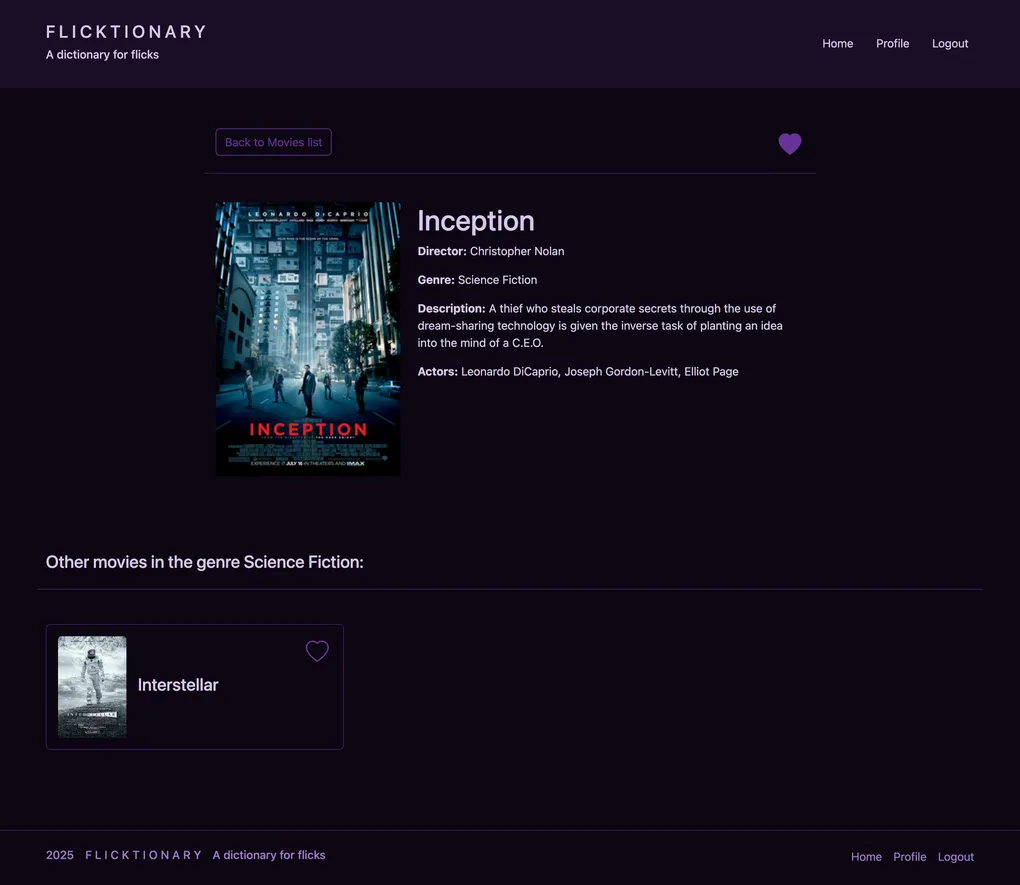
- Open detail views with descriptions, genre and director information, and other metadata.
- Search for movies by title and filter them by attributes like genre or director.
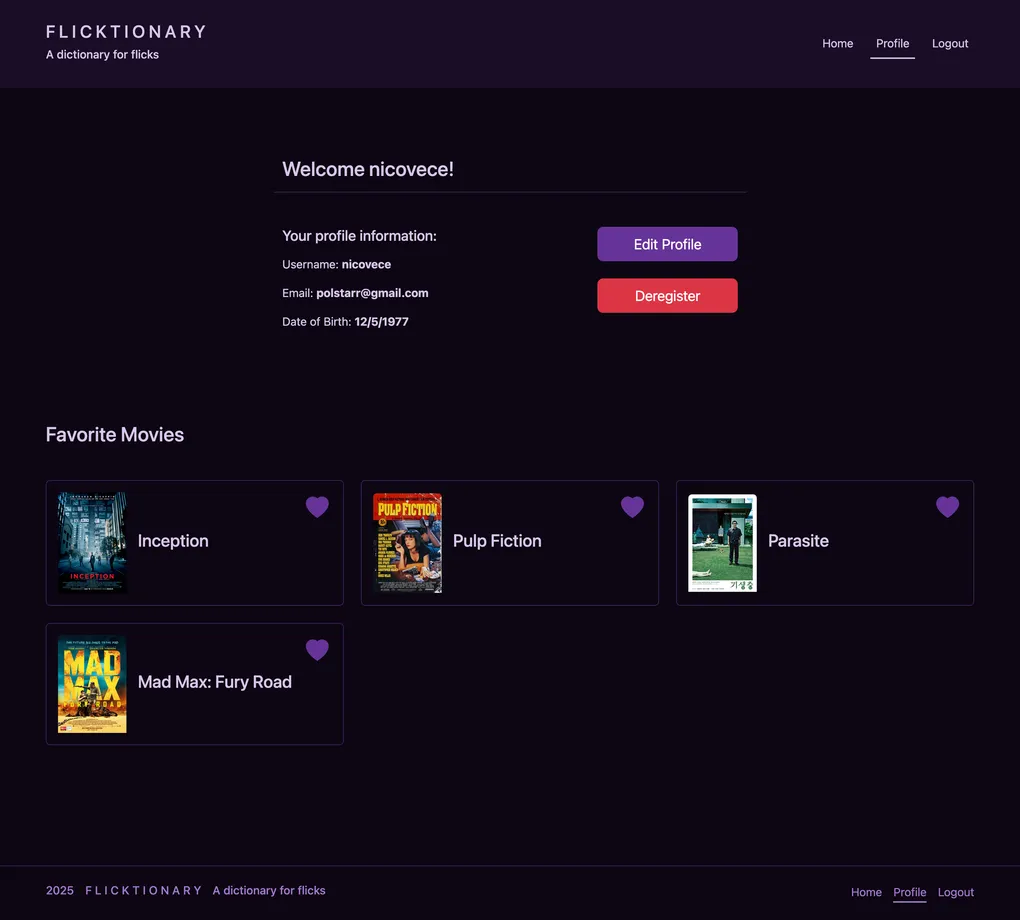
- Add or remove movies from your list of favorites and view your personal watchlist.
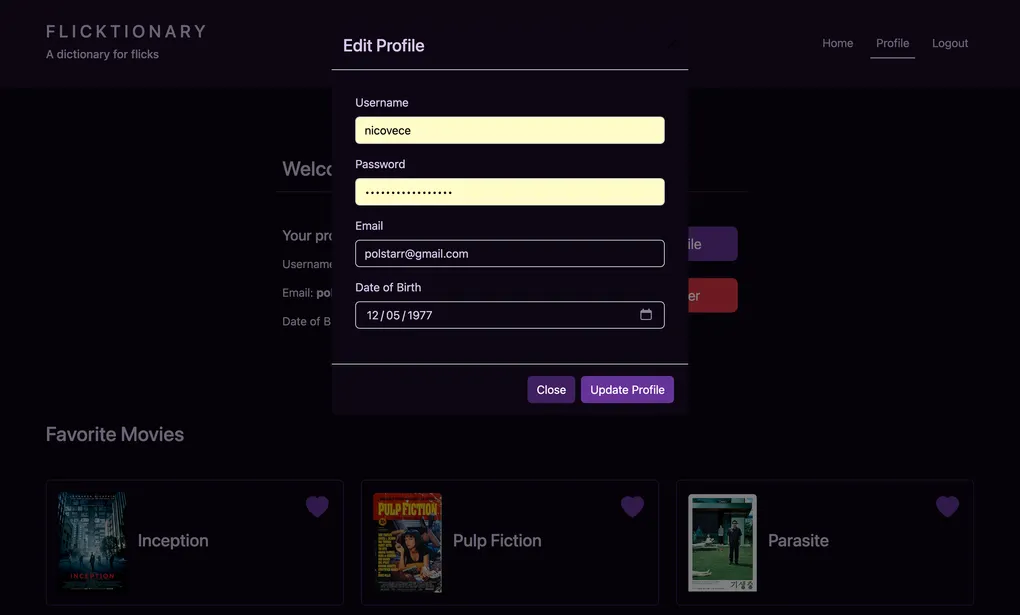
- Update basic profile information (such as username or email) and, if needed, delete the account.
The goal is to make the app feel like a simple “dictionary for flicks”: easy to dip into for quick information, but also capable of supporting longer browsing sessions.
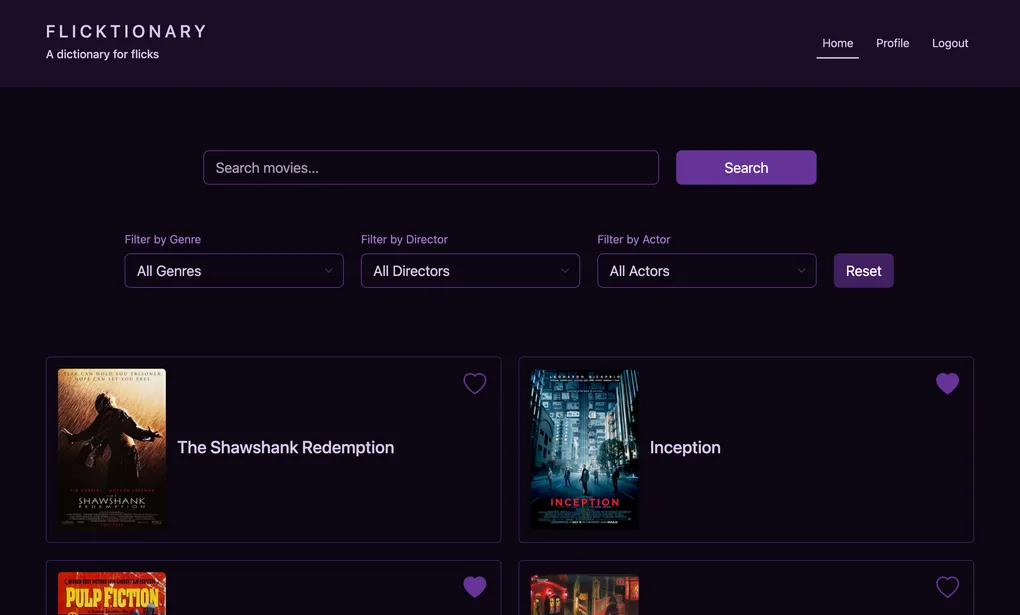
Home screen with movies list
Implementation & Testing
Key implementation highlights
- Routing & navigation: Used React Router to define routes for the main views (movies list, detail, profile, favorites, auth). This gives the app a multi-page feel without reloading the browser.
- API integration: Wrapped API calls in a small utility
layer so components can call functions like
getMovies()orupdateUser()instead of dealing with raw HTTP details. - Authentication: Implemented login and registration forms, token handling on the client, and UI guards for protected routes.
- Favorites management: Wired “Add to favorites” and “Remove from favorites” actions to both the API and local state, so the UI reflects server-side changes immediately.
- Styling & layout: Combined Bootstrap’s grid system with React Bootstrap components and custom SASS to keep the UI responsive and visually consistent.
Read full implementation processCollapse full implementation process
Phase 1 – Scaffolding the SPA
I started by setting up a small React project with Parcel, installing React Router, Bootstrap and React Bootstrap. The first step was to get a minimal layout working:
- a top-level navigation bar,
- placeholder views for Movies, Favorites, Profile, Login and Register,
- and basic routing between them.
Getting the skeleton in place early made it easier to reason about navigation and where each piece of functionality would live.
Phase 2 – Connecting to the API
Next, I created a simple API helper module to talk to the Flicktionary RESTful backend. This included:
- functions to fetch all movies or a single movie by ID,
- endpoints for user registration, login and profile updates,
- and endpoints for managing favorites.
By centralising this logic, I could later change details such as base URLs or headers without touching every component.
Key learning: Even in small apps, a thin data layer makes the codebase easier to evolve.
Phase 3 – Auth flow and protected views
With the API connected, I implemented the full auth flow:
- Registration and login forms with validation and error states.
- Storing the token after successful login and including it in subsequent requests.
- Conditionally rendering navigation items and views depending on whether the user is logged in.
- Redirecting unauthenticated users away from protected pages.
This phase was where the client truly became “aware” of the backend’s rules about who can access what.
Phase 4 – Movies, details and favorites
Once users could authenticate, I focused on the core movie experience:
- A movie list view with cards showing poster, title and a short description.
- A movie detail view showing extended info (description, genre, director).
- A simple favorites mechanism, letting users add/remove movies from their watchlist and see that list in a dedicated view.
I aimed for a straightforward pattern: interactions like favoriting trigger an API call, and on success, update local state so the UI feels immediate.
Phase 5 – Polishing, documentation and deployment
The final phase was about polishing and making the app ready to share:
- refining layouts for mobile vs. desktop,
- improving error messages and loading states,
- adding documentation in the app to explain key features and flows,
- and building a production bundle for deployment.
Key learning: For SPAs, perceived quality often comes down to “small” details like loading states, empty states and clear copy – not just whether the data loads.
Testing strategy
Flicktionary React does not yet have a full automated test suite, so I relied on a mix of manual testing and lightweight safety nets.
Read more about testingCollapse testing details
-
Manual testing of core flows:
- registering a new user, logging in and logging out;
- browsing the movies list and opening detail views;
- adding and removing favorites;
- updating profile details and confirming they persist;
- trying to access protected views while logged out.
-
Cross-device checks:
I tested the app on different viewport sizes to ensure the Bootstrap-based layout stayed usable on mobile, tablet and desktop. -
Runtime checks with PropTypes:
I used PropTypes on key components to catch obvious type mismatches during development (for example, expecting a movie object but gettingnull).
If I revisit this project, my next step will be to add automated tests – starting with component tests for key views (using React Testing Library) and a small number of end-to-end tests to cover critical flows like login and managing favorites.
UX & UI considerationsCollapse UX & UI considerations
UX & UI considerations
Even though this project was primarily about practicing React and SPA patterns, my design background influenced how I approached the interface:
-
Card-based layout for scanning:
Movie cards with posters and short text make it easy to scan a long list and decide what to click next. -
Clear primary actions:
CTAs like “Log in”, “Register”, “Add to favorites” and “Remove from favorites” are styled consistently so they read as primary actions across the app. -
Readable detail views:
I structured movie detail pages so that the most important information (title, poster, description) appears first, with secondary meta-information (genre, director) grouped underneath. -
Consistent navigation:
The navigation bar always exposes the same top-level sections, with auth-dependent items (Profile, Favorites) appearing only when relevant, keeping the UI predictable. -
Accessible defaults:
I leaned on Bootstrap’s defaults for focus outlines, contrast and spacing, then refined them with SASS to keep the app both clean and accessible.
ResultsCollapse results
Results
From a user’s perspective, Flicktionary React delivers:
- a smooth way to browse and discover movies in a single-page experience,
- quick access to rich movie details,
- and a simple watchlist feature through favorites and profile management.
From a learning perspective, this project helped me:
- connect a React SPA to a real RESTful backend,
- implement a complete auth flow on the client side,
- structure a small but non-trivial React codebase into views and reusable components,
- and ship a production build that is ready to be shared with others.
Limitations and Trade-offsCollapse limitations and trade-offs
Limitations and Trade-offs
- The app currently relies on client-side checks for protected routes; deeper security still lives on the API side.
- There is no global state management library (such as Redux or React Context) – for this size of app, lifted state and props were enough, but it would need rethinking as the app grows.
- There is no offline mode or PWA support; the app requires a network connection to function.
- Automated test coverage is minimal; most testing is manual.
Being explicit about these trade-offs keeps the project in perspective: this is a solid course-based SPA and a good representation of how I approach React work, not yet a production-scale product.
Future Improvements & RoadmapCollapse future improvements
Future Improvements & Roadmap
If I revisit Flicktionary React, natural next steps would be:
-
Stronger state management:
Introduce a global store (for example, React Context or Redux) to better centralize auth state and favorites. -
Automated testing:
Add component tests for key views and a small set of end-to-end tests for critical flows (login, favorites, profile updates). -
More powerful discovery:
Expand search and filtering (e.g. combo filters, saved searches, or “more like this” recommendations). -
Performance and UX enhancements:
Add pagination or infinite scroll for large catalogs, skeleton loading states and more fine-grained error handling.
These aren’t features I’m actively building right now, but they provide a clear roadmap if I decide to grow the project further.
What I learned
Working on Flicktionary React gave me a focused, end-to-end experience of building a small but complete SPA:
- structuring a React project into views, components and a simple data layer,
- wiring up authentication and protected routes against a real API,
- balancing visual design with performance and maintainability,
- and delivering a production-ready build that I can confidently show to recruiters and hiring managers.
Technologies Used
- React
- React DOM
- React Router
- Bootstrap
- React Bootstrap
- Parcel (bundler)
- SASS (styling)
- PropTypes (type checking)
- Custom RESTful Movie API (hosted at flicktionary.onrender.com))
- JavaScript (ES6+)