Flicktionary Angular frontend - A dictionary for flicks.
Project Overview
Flicktionary Angular Client is a single-page web application for exploring a movie database — a “dictionary for flicks” where users can browse films, see details, and manage their own favorites and profile. It consumes the Flicktionary REST API and adds an Angular-powered UI on top.
- Role: Solo front-end developer
- Context: Course project for building a modern Angular SPA that talks to an existing API
- Tech: Angular, TypeScript, Angular Material, Angular Universal (SSR), RxJS, Jasmine & Karma, TypeDoc
The goal was to build a responsive, production-ready front end that handles authentication, movie browsing, favorites, and profile management — while following Angular best practices around modules, services, routing, and testing.
Read more about the brief and goalsCollapse brief and goals
The course brief defined Flicktionary as a client for an existing REST API: a movie database with endpoints for films, genres, directors and users. The client had to support:
- registration and login,
- viewing a catalog of movies,
- showing details about a movie, its genre and its director,
- managing a list of favorite movies, and
- updating or deleting a user account.
On top of that, I treated the project as a chance to practice:
- structuring an Angular app into modules and components,
- using services and RxJS to consume a REST API,
- adding server-side rendering (SSR) for performance and SEO,
- and setting up unit tests and documentation for long-term maintainability.
I considered the project successful if:
- users could log in, browse movies and manage favorites without encountering errors,
- the UI remained responsive and usable on both desktop and mobile,
- the Angular code stayed modular and easy to reason about,
- and I had an automated test baseline and documentation that could support future changes.
Architecture Overview
At a high level, Flicktionary is a modular Angular SPA with SSR and a shared data service talking to a REST API.
Read architecture detailsCollapse architecture details
-
Angular modules & routing:
The app is split into feature areas (welcome/auth, movies, profile). Angular routing handles navigation between the welcome screen, movie list and user profile, with guards to protect authenticated routes. -
Data access via services:
A centralfetch-api-dataservice wrapsHttpClientcalls to the Flicktionary REST API. Methods likegetAllMovies,getUser,addFavoriteordeleteUserreturn RxJS Observables, which components subscribe to in a structured way. -
State in components:
Movie lists, favorites and user data are held in component state, updated in response to service calls. Angular Material components (cards, dialogs, toolbar, buttons) provide the visual shell. -
SSR with Angular Universal:
The project supports server-side rendering so initial loads are fast and pages can be indexed more easily. An Express-based server renders the Angular app on the server and proxies API calls to the backend. -
Testing & documentation:
Unit tests are written with Jasmine & Karma, and TypeDoc is configured to generate documentation from the TypeScript source. Both are integrated into the project’s npm scripts.
What the app does
From a user’s point of view, Flicktionary lets you:
- Sign up and log in to access the movie catalog.
- Browse all movies in a card-based layout.
- Open dialogs to see:
- detailed movie information,
- genre descriptions,
- and director biographies.
- Mark favorites by toggling a heart icon on movie cards.
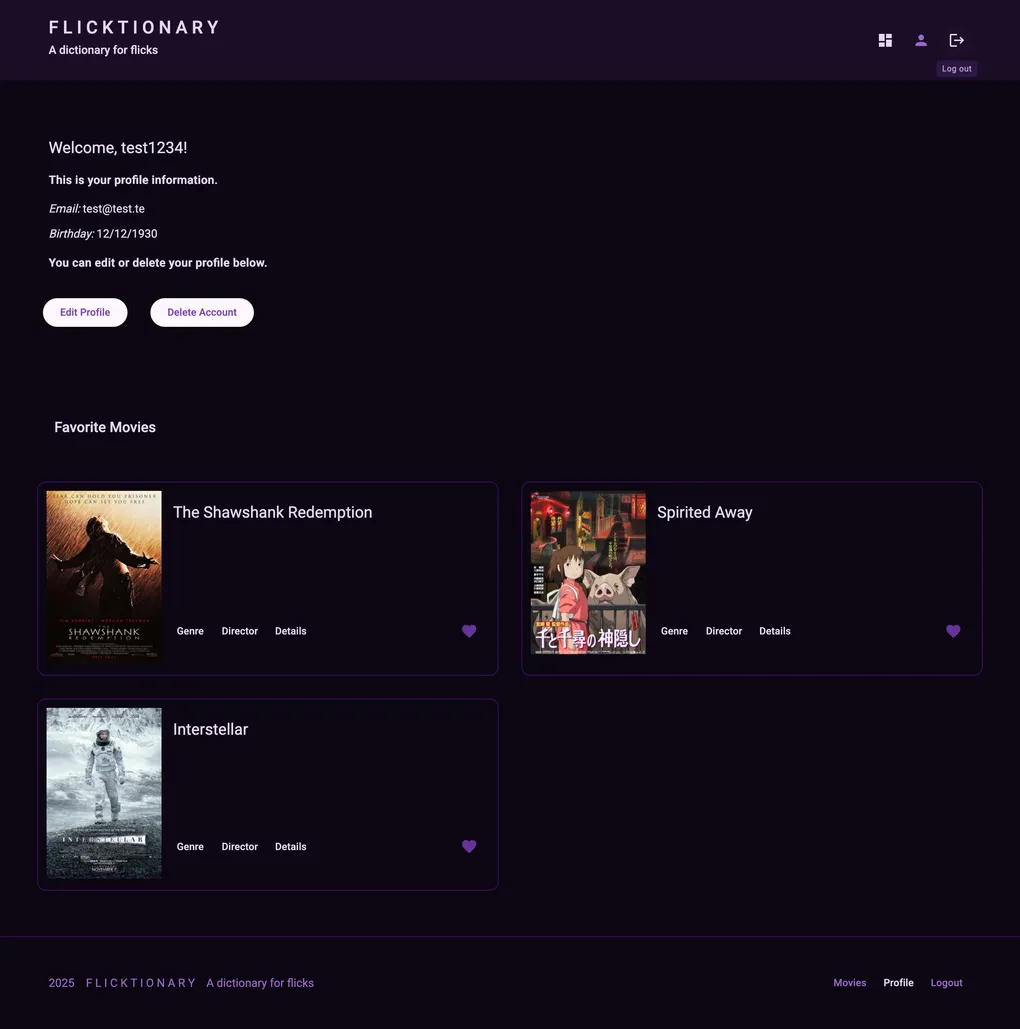
- View and edit your profile, including your data and favorites.
- Delete your account entirely if you no longer want to use the app.
The interface is built with Angular Material, so common interactions (dialogs, navigation, buttons) feel consistent and accessible across desktop and mobile.
Implementation & Testing
Key implementation highlights
- API integration: Created a dedicated data service wrapping Angular’s
HttpClientto handle authentication and CRUD-style calls to the Flicktionary REST API. - Modular Angular structure: Split the app into feature components (welcome, movie list, movie card, dialogs, profile) with clear routing and navigation.
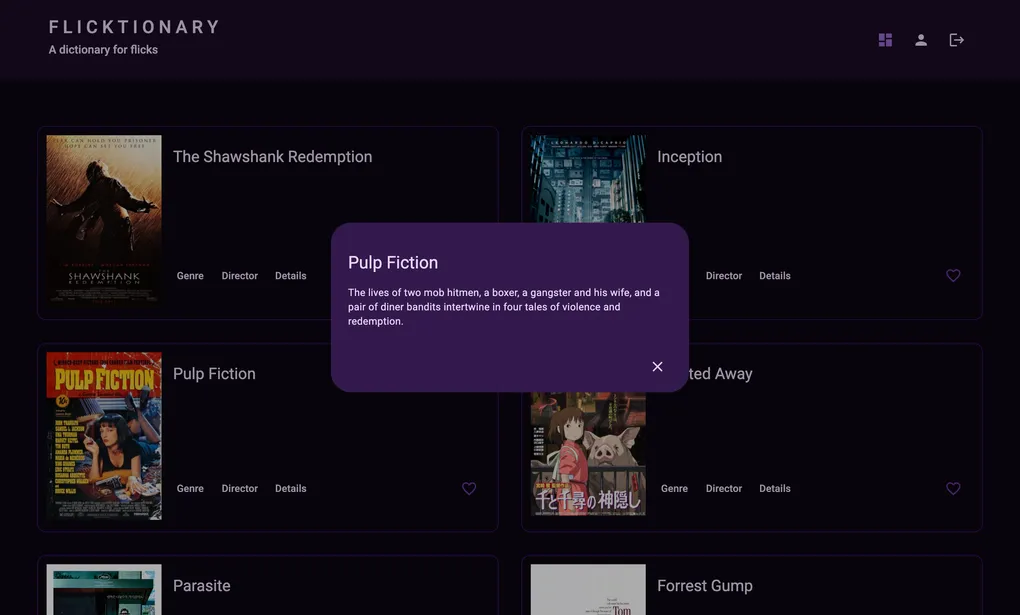
- Dialogs & Angular Material: Used Material dialogs to show movie, genre and director details without forcing full page navigations.
- Favorites & profile: Implemented favorite movies and profile editing with clear feedback when changes succeed or fail.
- SSR support: Configured Angular Universal and an Express server to support server-side rendering and API proxying.
Read full implementation processCollapse full implementation process
Phase 1 – Understanding the API and outlining features
I started by reviewing the Flicktionary API: available endpoints for movies, genres, directors and users, required auth headers, and typical response shapes. From there, I mapped the required user flows into screens and components: welcome/auth, movie list, dialogs for details, and user profile.
Key learning: Starting from the API contract helps shape both the routing structure and the data service design.
Phase 2 – Setting up modules, routing and layout
Next, I scaffolded the Angular app with a basic module and routing setup, and introduced Angular Material for layout, cards and dialogs. I built a simple navbar, a welcome page, and a placeholder movie list to validate navigation and styling patterns early.
Key learning: Getting navigation and basic layout in place early makes it easier to plug in real data later without redesigning the UI.
Phase 3 – Implementing the data service and movie browsing
I then created a dedicated API service using HttpClient to connect to the Flicktionary backend. This service exposes methods like getAllMovies, getMovie, getUser, addFavorite and removeFavorite, returning Observables that components subscribe to.
With the service in place, I wired the movie list to real data, handling loading and error states in the UI.
Key learning: Centralizing API calls in a service keeps components lean and makes it easier to handle cross-cutting concerns like auth headers and error handling.
Phase 4 – Favorites, dialogs and profile management
After basic browsing worked, I focused on interactivity:
- a heart icon on movie cards to add/remove favorites,
- dialogs for movie, genre and director details, and
- a profile view where users can update their info or delete their account.
I paid attention to feedback: showing snackbars or clear state changes when a favorite is added/removed or when profile updates succeed.
Key learning: Small feedback mechanisms (like snackbars or visual state changes) do a lot of UX work in making an app feel responsive and trustworthy.
Phase 5 – SSR, testing and documentation
In the last phase, I set up Angular Universal for server-side rendering and ensured the app could run in SSR mode with an Express server. I also added unit tests for critical components and the API service, and configured TypeDoc to generate documentation from the TypeScript code.
Key learning: Adding SSR, tests and documentation at the end of a project is a good reminder that “done” for a front-end app is more than “it runs on my machine”.
Testing strategy
Flicktionary includes unit tests with Jasmine and Karma alongside manual testing of key user flows.
Read more about testingCollapse testing details
-
Automated tests:
- Component-level tests check that core views (welcome, movie list, profile) render correctly and react to inputs as expected.
- Service tests verify that the API service calls the correct endpoints and returns data in the expected shape.
- Tests are run with
ng test, using Karma as the test runner and Jasmine as the assertion library.
-
Manual testing:
I manually tested the main flows end-to-end in the browser:- registering a user, logging in and logging out,
- browsing the movie list and opening dialogs,
- adding and removing favorites,
- editing the user profile, and
- deleting the user account and confirming the behavior.
If I revisit the project, I would expand the test coverage around error handling (e.g. network failures, expired tokens) and add more focused tests for route guards and SSR-specific behavior.
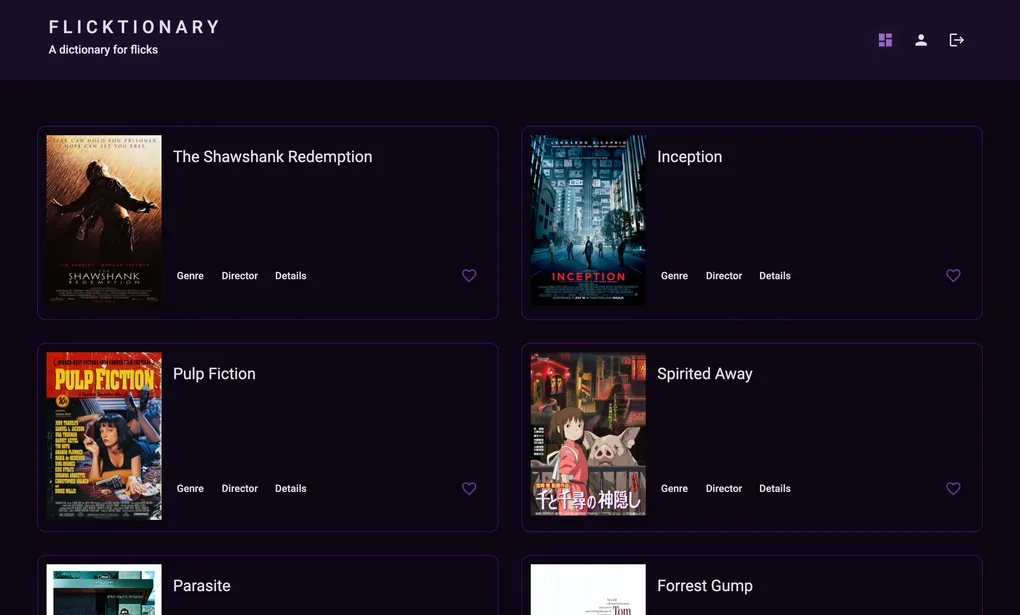
Home screen with movies list
UX & UI considerations
This project was primarily about front-end architecture and API integration, but my design background still influenced how I structured the interface.
A few examples:
- Clear entry point: The welcome page focuses on two primary actions — sign up and log in — so new users immediately know how to start.
- Card-based movie layout: Movies are presented as cards with consistent structure (poster, title, core info, actions), making scanning and comparison easy.
- Dialogs for details: Instead of sending users to separate pages, dialogs show extra details (movie, genre, director) on top of the current context, which keeps navigation light.
- Responsive layout: Angular Material’s grid and responsive breakpoints help the app adapt to different screen sizes without custom CSS for every layout case.
- Consistent styling: Using Angular Material as a baseline keeps the visual language consistent across buttons, lists, dialogs and forms.
ResultsCollapse results
Results
From a user’s perspective, Flicktionary provides:
- a simple way to sign up, log in and browse a catalog of movies,
- quick access to details about each movie, its genre and its director,
- and a personal favorites list and profile that they can manage themselves.
From a learning perspective, this project helped me:
- get comfortable structuring a real Angular app with modules, routing and services,
- integrate a front end with a REST API using
HttpClientand RxJS Observables, - use Angular Material to build a responsive, accessible UI,
- and set up SSR, unit tests and documentation in a modern TypeScript project.
Limitations and Trade-offsCollapse limitations and trade-offs
Limitations and Trade-offs
Some known limitations and trade-offs:
- Error handling is basic: the app shows simple messages, but doesn’t yet differentiate between different failure modes (e.g. network errors vs. auth issues).
- Client-side state is relatively simple: there is no global state management library; data is fetched per view and held in component state.
- Accessibility could be improved further, for example by auditing keyboard navigation and ARIA attributes in all dialogs and interactive elements.
- The app assumes a single API backend and doesn’t yet handle multi-environment configuration beyond the basic setup.
These are acceptable for a course project, but they also point to clear next steps for making the client more robust and production-ready.
Future Improvements & RoadmapCollapse future improvements
Future Improvements & Roadmap
If I revisit Flicktionary, some natural extensions would be:
-
Richer filtering & sorting
Allow users to filter by multiple criteria (year, rating, runtime) and sort results. -
Improved error and loading states
Add more nuanced feedback for slow API responses, rate limits or auth errors. -
Accessibility improvements
Run an accessibility audit and refine keyboard navigation, focus states and ARIA labelling. -
Client-side caching / state management
Introduce a lightweight state management solution or caching layer for repeated API calls. -
More thorough test coverage
Expand unit and possibly end-to-end tests to cover edge cases, route guards and SSR-specific behavior.
What I learned
Working on Flicktionary gave me practical experience with building a real-world Angular client:
- structuring an app with modules, routing, services and shared components,
- integrating a TypeScript front end with a RESTful API using
HttpClientand RxJS, - using Angular Material to ship a responsive, accessible UI faster,
- and setting up SSR, unit tests and documentation as part of the project, not as an afterthought.
Overall, this project helped me move from “I’ve followed Angular tutorials” to “I’ve shipped a small but complete Angular client that talks to a real API and can be maintained and extended.”
Technologies Used
- Angular
- TypeScript
- Angular Material
- RxJS
- Angular CLI
- Jasmine & Karma (for unit testing)
- Express (for SSR and API proxy)
- TypeDoc (for documentation)
- SCSS (for custom styles))
- RESTful API (backend integration)
- Zone.js (for Angular change detection)